Aug 7

 Pranab kundu
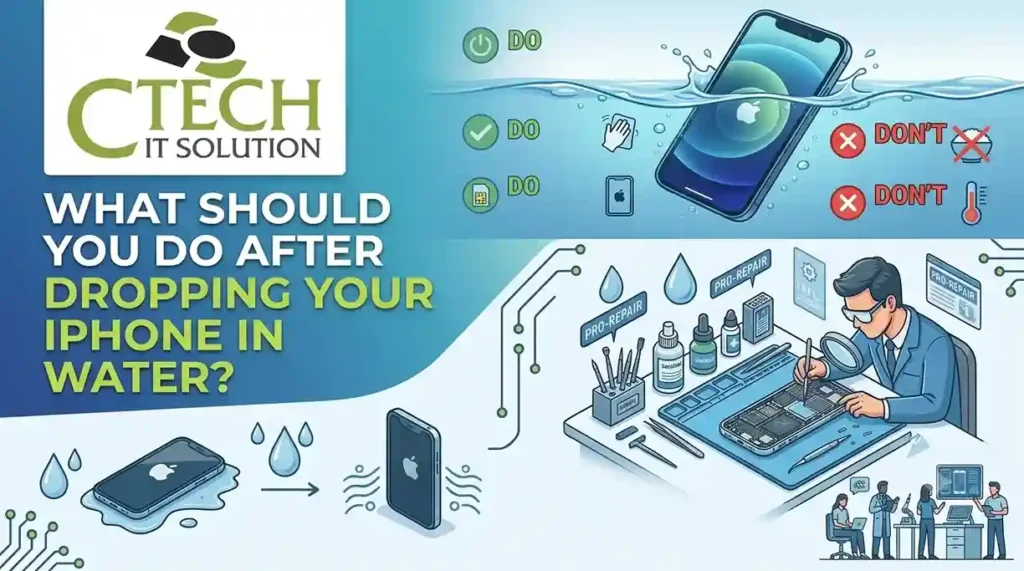
Accidentally dropping an iPhone in water can cause liquid damage to internal components, charging ports, speakers, and the display. Acting quickly can reduce further damage. Avoid charging or repeatedly switching on the device, dry the exterior carefully, and seek professional iPhone liquid damage repair service when needed. These emergency steps can improve the chances of proper recovery.
If you’re wondering, “What should you do if your iPhone falls in water?”,Unplug all accessories right away, carefully wipe away any excess moisture, and leave the device switched off.. Don’t use heat or insert objects into the charging port. For professional diagnosis, a Best iPhone Repair Service Center in Kolkata can assess liquid exposure and recommend appropriate repair or component-level service.
The first few minutes matter. Follow these steps:
Some common reactions can actually increase the risk of damage.
The safest approach is to minimize power and moisture exposure and obtain professional assessment when necessary.
Liquid can reach sensitive internal components through openings such as the charging port, speakers, microphones, SIM tray, or other pathways.
Potentially affected components include:
| Component | Possible Effect |
| Charging port | Charging or connection problems |
| Battery | Power-related issues |
| Display | Flickering, touch problems, or discoloration |
| Speakers | Distorted or reduced audio |
| Microphones | Poor call or recording quality |
| Logic board | Serious functional problems |
| Cameras | Fogging or image issues |
| Connectors | Corrosion or intermittent faults |
The severity depends on the type of liquid, duration of exposure, depth of immersion, device condition, and affected components.
It is best not to charge an iPhone while moisture may still be present in the charging port. Charging when liquid is present can potentially cause electrical or corrosion-related problems.
If the phone displays a liquid-detection warning, disconnect the cable and allow the connector to dry naturally. If the warning persists or the device behaves abnormally, professional inspection is advisable.
If the iPhone is switched off after liquid exposure, avoid turning it back on simply to check whether it works.
Power combined with moisture can increase the possibility of electrical damage. A repair professional can inspect the device before you resume normal use.
Professional assistance becomes especially important when you notice:
Searching for an emergency iPhone water damage repair near me may be appropriate when the device has significant exposure or develops immediate problems.
A professional iPhone liquid damage repair service generally begins with diagnosis rather than immediately replacing parts.
Depending on the device condition, technicians may assess:
The exact repair procedure depends on the model and extent of damage.
Water damage is not always visible from outside. An iPhone may appear to work normally while moisture or corrosion affects internal components.
Professional diagnosis can help determine:
This makes professional assessment more useful than repeatedly testing the device at home.
When selecting the Best iPhone Repair Service Center in Kolkata, consider technical expertise, diagnostic capability, transparent communication, repair quality, and experience with liquid-damaged devices.
Look for a service provider that offers:
A low-cost repair is not necessarily the best repair if the underlying liquid damage has not been properly diagnosed.
For users with multiple Apple products, a provider offering broader Apple support can be convenient.
A Best Apple Repair Service Center in Kolkata may assist with issues involving:
For MacBook owners, related services such as Best Macbook Repair Service Center in Kolkata can provide specialized troubleshooting for Apple’s laptop hardware.
| Do This | Avoid This |
| Remove the phone from liquid | Don’t keep using it |
| Power it off | Don’t repeatedly restart it |
| Wipe the exterior | Don’t use direct heat |
| Remove accessories | Don’t insert objects into ports |
| Keep it ventilated | Don’t immediately charge it |
| Seek professional assessment | Don’t assume it is fully dry |
Not all liquid exposure is identical. Potentially problematic liquids include:
Liquids containing salt, sugar, chemicals, or other contaminants may create additional concerns because they can leave residues or contribute to corrosion.
Salt water can be particularly concerning because dissolved salts and contaminants can remain on internal surfaces after evaporation.
If an iPhone is exposed to seawater:
The appropriate technical response depends on the device and extent of exposure. Check Client’s reviews click: https://shorturl.at/C6apI
C Tech IT Solution, led by Chandan Saha, can provide a structured approach to Apple-device troubleshooting by focusing on diagnosis before recommending repair.
For users seeking an iPhone liquid damage repair center, the priority should be identifying the extent of internal damage and determining the most appropriate repair path rather than simply replacing visible components.
The same service ecosystem can also support customers looking for Apple and MacBook repair assistance in Kolkata.
What to Do When an iPhone Gets Wet
If your iPhone gets wet, remove it from the liquid, disconnect accessories, turn it off, gently dry the exterior, avoid heat and immediate charging, and seek professional inspection if exposure is significant or problems develop.
Water exposure does not always mean an iPhone is beyond repair, but quick and careful action matters. Avoid charging, heat, and repeated power attempts, then seek professional diagnosis when necessary. C Tech IT Solution, led by Chandan Saha, can help users evaluate liquid-related problems and identify suitable repair options for iPhones and other Apple devices. Visit our Map Address click: https://maps.app.goo.gl/XjpkpiNGy8Hqwxdz6
What should you do if your iPhone falls in water?
Turn the iPhone off, remove accessories, gently dry the exterior, avoid charging or using heat, and seek professional assessment if the exposure was significant.
Can I put my wet iPhone in rice?
Rice is not a reliable repair method and may introduce particles into ports. Controlled air drying and professional assessment are safer approaches when significant liquid exposure occurs.
How long should I wait before charging a wet iPhone?
Do not charge while moisture may remain in the charging port. Follow Apple’s applicable liquid-detection guidance and seek professional assistance if moisture or a warning persists.
Can a water-damaged iPhone be repaired?
It may be repairable, depending on the extent and location of the liquid damage. Professional diagnosis is necessary to determine the condition of internal components.
What are common signs of iPhone liquid damage?
Possible signs include charging failure, speaker distortion, display problems, unexpected shutdowns, camera issues, overheating, touch problems, or failure to power on.
Where can I find emergency iPhone water damage repair near me?
Look for an experienced local repair provider with dedicated liquid-damage diagnostic capabilities. In Kolkata, customers can consider a professional iPhone liquid damage repair service from a reputable repair center.
Is professional iPhone liquid damage repair expensive?
The cost varies according to the iPhone model, affected components, severity of exposure, and required repair. A diagnostic assessment should precede any accurate quotation.
Can water damage affect iPhone data?
Yes. Severe liquid damage can affect components required for normal device operation. If important data is stored on the phone, avoid repeated power attempts and discuss data-preservation considerations with a qualified technician.




Our team of experts is ready to assist you with any Apple device repairs or issues.
Contact Us Today
464/1, Jessore Rd, Amarpalli, South Dum Dum, West Bengal 700074